What the EA Does Differently
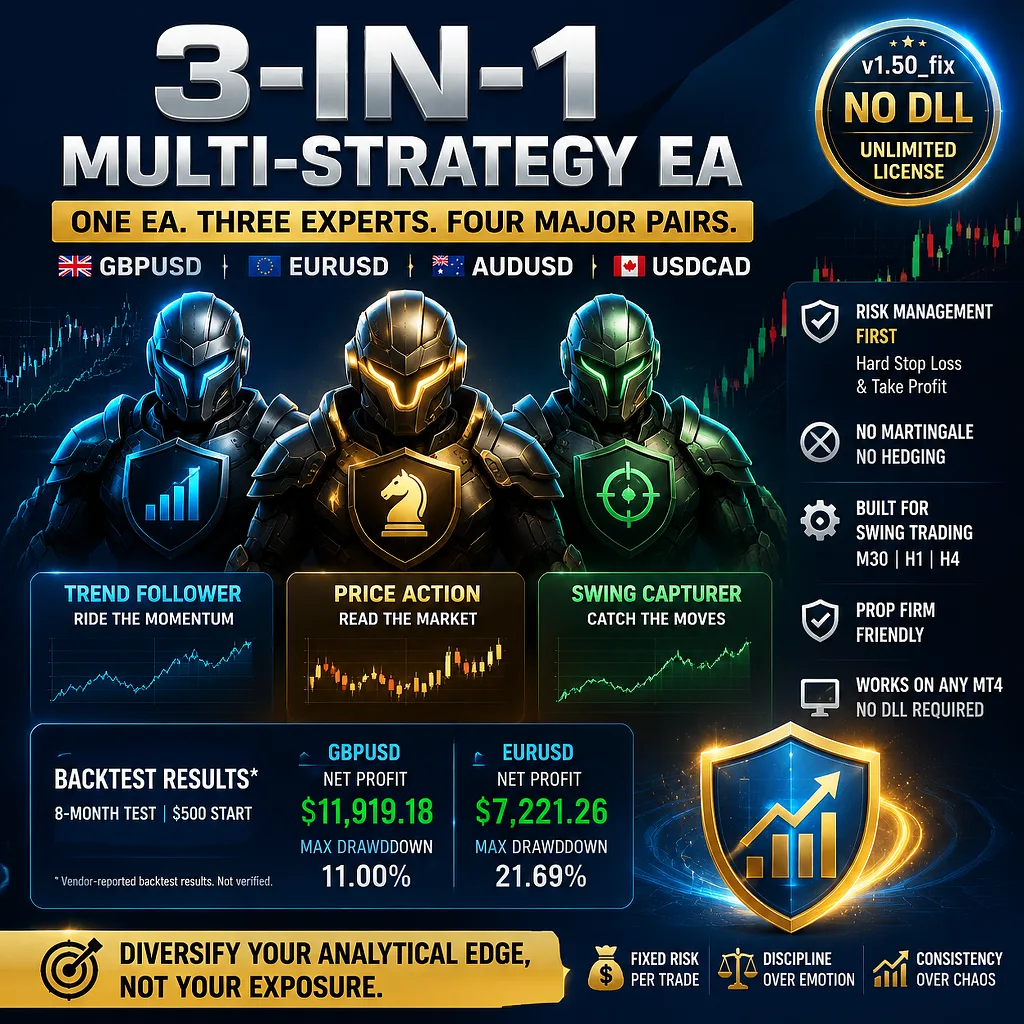
Most multi-pair robots simply duplicate one logic across several charts. This product bundles three separate expert advisors into a single .ex4 file, with each one applying its own price action interpretation to the four supported majors: GBPUSD, EURUSD, AUDUSD, and USDCAD. The stated purpose is to diversify the analytical angle rather than the exposure, so a trader watching different market regimes can let the EA rotate its internal logic instead of running three separate installations.
The vendor positions this as a risk-management tool first. Every trade carries a hard stop loss and a take profit, and the rule set explicitly rules out martingale and hedging. That removes two of the most common reasons an account blows up, but it also means the EA does not recover from a losing streak by averaging down. A trader who is sceptical of systems that promise recovery after drawdowns may appreciate this constraint; a trader looking for quick rebound mechanics will not find them here.
How the Three Strategies Interact in Practice
Because the developer does not document the exact entry logic for each of the three internal experts, the practical behaviour is inferred from the recommended timeframes and pairs. M30, H1, and H4 are the supported chart periods, which suggests the EA is built for swing-style holds rather than scalping. The lower timeframes of M30 and H1 can produce more frequent signals, while H4 filters for broader moves.
An experienced trader will want to know how the three experts share risk or whether they can open concurrent trades on the same pair. The vendor does not publish this detail. The product description mentions a fixed stop loss and take profit on every trade, but it does not specify whether the EA uses a single risk limit per symbol or a combined limit across all four pairs. That ambiguity is a practical consideration before loading more than one chart.
The lack of martingale or grid recovery means drawdown behaviour is tied to the underlying win rate and the fixed risk per trade. A sequence of losing trades will shrink the account in a linear fashion, which is easier to model than a martingale system but also offers no acceleration on the recovery side. The vendor publicises backtests with maximum drawdowns of 11% and 21.69% on GBPUSD and EURUSD respectively, but those numbers are reported by the vendor and have not been verified on a fresh tick data set.
What the Backtest Figures Actually Show
The supplied marketing copy lists two eight-month backtests using a $500 starting deposit. The GBPUSD test closed with a reported net profit of $11,919.18 and a maximum drawdown of 11.00%; the EURUSD test reported $7,221.26 and 21.69%. Those are not small numbers relative to the deposit, and a sceptical trader should treat them as the vendor's own figures rather than audited results.
Backtests of this style often rely on the broker's historical data, modelling quality, and the exact spread assumptions of the test period. The vendor does not disclose slippage, commission, or swap settings. The minimum deposit for live trading is listed as $100, but the backtests used $500. That gap matters: the risk per trade is presumably set by the EA's internal money management, so a $100 account would need scaling advice that has not been published.
Setting Up the EA on MT4
The downloadable package contains a single compiled .ex4 file labelled v1.50_fix. No source code is included, and the licence is described as NoDLL/Unlimited, meaning it does not require external DLL calls and can be activated on any number of MT4 installations without a server-based unlock. That is a practical advantage for traders who switch between a home computer and a VPS.
Installation follows the standard MT4 flow: copy the .ex4 into the Experts folder, restart the terminal, enable automated trading, and attach the EA to one of the four supported pair charts. The recommended timeframe is M30, H1, or H4. There are no set files in the package, so every input must be configured manually. Traders who prefer to load a vendor-tuned configuration will need to spend time with the parameter list, because the download does not ship with presets for each pair.
Regarding the prop-firm claim: the vendor states the EA meets prop firm standards and shows user comments on the MQL5 community. The product does not include a separate prop-firm mode or a news filter toggle, so traders using it with a funded account should still test how the three experts behave around high-impact releases.
What a Realistic Expectation Looks Like
A $655 price point places this EA well above the average compiled-only product. The absence of source code means the trader cannot audit the logic or adjust the core entry rules beyond whatever input parameters are exposed. The developer has other products in the same catalogue, which gives some continuity, but that pedigree does not substitute for forward testing on a demo account.
The EA's strongest feature for a sceptical buyer is the concrete set of structural constraints: a fixed stop loss, a fixed take profit, no martingale, no hedging, and no DLL dependency. That is a narrower and more honest promise than a vague claim of profitability. The main work of due diligence is to run the EA on the recommended pairs and timeframes for at least several weeks of live market feed, because the vendor backtests are the only performance evidence provided and they cover a single eight-month window for two of the four supported pairs.