Running multiple MT4 and MT5 terminals on one machine
MetaTrader installs one terminal per broker by default, and two expert advisors on the same chart will fight over it. The fix is separate, isolated terminal copies — one per broker, or several for the same broker. This page covers how to do that by hand, and the free tool that automates it for 90+ brokers.
Why one terminal is not enough
A single MetaTrader install keeps one data folder, one set of charts, and one MQL4/MQL5 directory. That becomes a problem the moment you run more than one strategy:
- Two EAs cannot share a chart. One symbol on one timeframe holds exactly one expert advisor, so a second strategy on EURUSD M15 needs a second chart — and if both want the same chart, a second terminal.
- Magic numbers are not isolation. Two EAs in the same terminal still share account equity, free margin and the same trade context. A martingale sequence in one drains the margin the other needs.
- Prop firm accounts are usually separate logins. Challenge, verification and funded accounts each need their own terminal to run at the same time.
- One crash takes everything with it. A terminal that hangs on a bad tick takes every EA inside it offline at once.
Doing it by hand
This works on any Windows machine and needs no third-party software. It is worth understanding even if you use a tool afterwards, because it explains what the tool is actually doing.
- Download the installer from the broker itself. Broker builds are pre-configured with the correct server list, and a MetaTrader binary from an unknown source is a credential-theft risk you cannot detect after the fact.
- Choose a custom install path. Run the installer, open Settings, and set a folder that names the broker and the purpose — for example C:\Terminals\Pepperstone-Live-01. Never accept the default path for the second and later copies; the installer will simply reuse the existing folder.
- Repeat for every terminal you need. Each new path produces a fully isolated terminal with its own data directory. Keep the naming scheme consistent — with a dozen terminals running, guessing which window is which account is how mistakes happen.
- Install your EA into the right terminal. In each terminal, open File → Open Data Folder, then drop the .ex4 or .ex5 file into MQL4/Experts or MQL5/Experts and restart it. The expert advisor now exists only inside that copy, which is the entire point.
- Give each terminal its own chart profile. On a VPS, also enable auto-start so the terminals come back after a reboot without you noticing it happened.
The key detail is the install path. MetaTrader keys its data folder off the install directory, so two copies in two different folders stay fully independent — separate logins, charts, MQL folders and EAs.
The tool that automates this
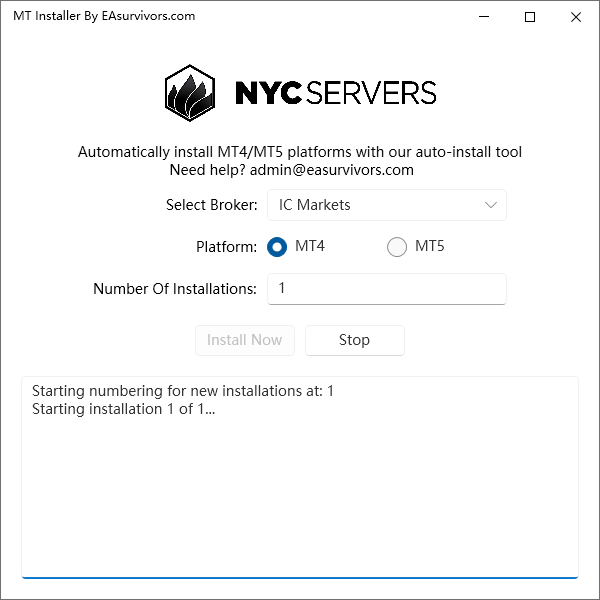
MT Installer is a free Windows utility that does the loop above for you: pick a broker from a list, set how many copies you want, and it downloads that broker's installer and lays down that many isolated terminals.
All download exe file on the mql5 server .
like :
https://download.mql5.com/cdn/web/18036/mt4/icmarketssc4setup.exe
https://download.mql5.com/cdn/web/acy.securities.pty/mt4/acysecurities4setup.exe
https://download.terminal.free/cdn/web/vantage.markets.pty/mt5/vantagemarkets5setup.exe
Download Now : link
A note on running this on a VPS
Each terminal costs roughly 150–250 MB of RAM once it is running with a chart or two. Ten terminals is a 4 GB machine minimum, and CPU matters more than you expect during high-volatility sessions when every terminal is processing ticks at once. Size the box before you install ten copies, not after.
Frequently asked questions
How many MT4 or MT5 terminals can I run at once?
There is no software limit — the constraint is RAM and CPU. Budget roughly 150–250 MB per running terminal, so about ten on a 4 GB machine. Terminals sitting idle with no charts open use noticeably less.
Will running several terminals let two EAs trade the same account?
Yes, and you should think carefully before doing it. Terminals are isolated from each other but the account is not: they share equity, free margin and exposure. Two EAs on one account can each look correctly sized while together being twice the risk you intended.
Does installing a second terminal affect the first one?
No, provided you install to a different folder. MetaTrader derives its data folder from the install path, so separate paths mean separate charts, logins, settings and MQL directories. Installing to the same path overwrites the existing copy instead of adding one.
Is MT Installer safe to run?
It is a third-party tool by NYCServers, not by us, and we have not audited it. Download it from the author only, and treat any MetaTrader-adjacent executable from an unfamiliar source with suspicion — trading terminals hold live account credentials.
Do I need a separate terminal for every expert advisor?
Not always. One terminal can host several EAs as long as each sits on a different symbol or timeframe. You need separate terminals when two EAs want the same chart, when they belong to different brokers or accounts, or when you want a crash in one to not take the others down.
Can I do this on a Mac?
Only through a Windows layer — Parallels, a VM, or a Windows VPS. The native macOS MetaTrader builds are wrappers around the same Windows binaries and multiple isolated installs are unreliable on them. Most people running several terminals rent a Windows VPS.
While you are here
Every expert advisor on this site carries a verdict on how it can lose money — whether one losing sequence has an upper bound or not. That verdict sits at the top of each product page, including the ones we would rather not publish.
Browse tested expert advisors