What problem does it solve
Automated scalping on EURUSD sounds simple until you try to run it on a live account. Slippage, spread widening, and broker execution gaps eat into the small per-trade gains that a scalper depends on. Many retail EAs fail at this stage even when their backtests look clean. The value of an EA like TeamGG is not that it removes risk, but that it automates the entry and exit logic consistently, removing hesitation and manual errors from the equation.
This EA is built for MetaTrader 4 only. It targets EURUSD, which is the most liquid pair and therefore the most forgiving for a scalping approach. The developer states that it can run on any timeframe, but the included set files are both for H1. That is a practical compromise: the signals are generated on hourly candles, while the actual trade management happens at a much finer granularity. If you expect it to behave like a tick scalper, you will be disappointed; if you want a slower-paced scalper that works from higher timeframe confirmations, the design makes sense.
The package contains the compiled .ex4 file – source code is not included. That means you cannot modify the core logic, and you cannot inspect exactly what conditions trigger a trade. Some traders see that as a downside; others accept it as a way to protect the developer's work. The licence is listed as NoDLL/Fix, which means the EA does not call external DLL functions. That lowers the chance of compatibility problems on a standard Windows VPS or local machine, and it also means the EA cannot download data from external servers at runtime. Everything it needs is contained in the file itself.
How the scalping logic is meant to behave
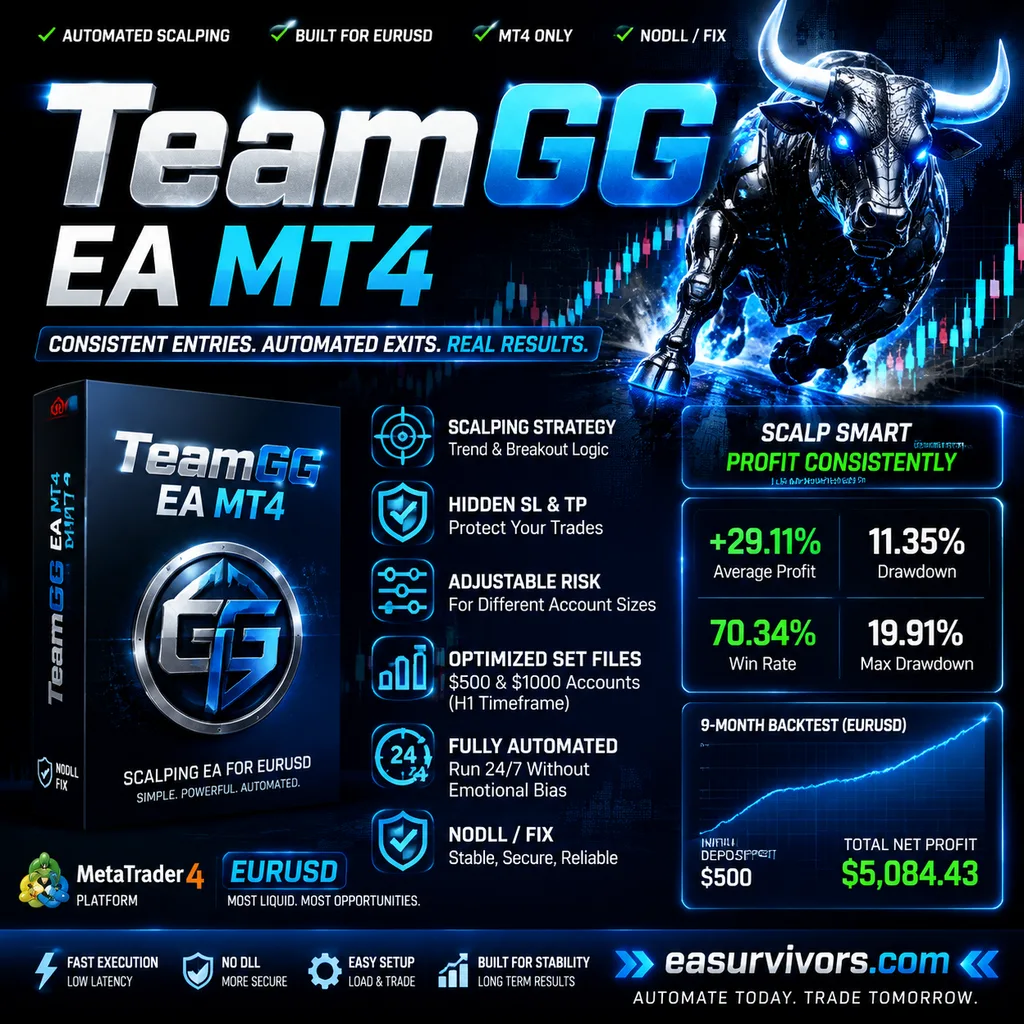
The vendor's marketing talks about multiple trading strategies, including trend following and breakout logic, but the dominant style for this product is scalping. The EA opens and closes trades quickly, aiming for small gains on EURUSD. Hidden stop loss and take profit levels are part of the design, which means the broker does not see your protective orders. That can be useful on servers with stop-hunting, but it also means you cannot verify the actual risk per trade from the terminal's open order display.
Position sizing and adjustable risk parameters are included. The two set files provided are tuned for a $500 and a $1000 account respectively on the H1 timeframe. A $500 starting balance for a scalping EA is aggressive. The developer's own backtest shows a maximum drawdown of 19.91%, which on a $500 account is roughly a $100 floating loss at the worst point. That is not extreme for a scalper, but it is also not a trivial amount. Anyone running this on a cent account or a heavily leveraged live account should reduce the risk setting below the default until they have seen how the EA handles spread widening during news.
The developer reports average profit of 29.11% with a drawdown of 11.35% on a Myfxbook-verified live or demo account in 2023. Those numbers are attributed to the vendor, not independently confirmed by this catalogue. They are also not forward-looking guarantees. A scalper's results depend heavily on the account's spread and commission structure, not just on the signal logic. The same EA can be profitable on one broker and break-even on another.
What the backtest actually shows
The developer provides a nine-month backtest on EURUSD. Initial deposit was $500, total net profit $5,084.43, win rate 70.34%, maximum drawdown 19.91%. A 70% win rate is not uncommon in scalping systems because they take many small wins and occasionally one bigger loss. The profit factor implied by those numbers is reasonable, but the backtest quality is unknown. The vendor does not state whether it used tick data, real spreads, or a fixed spread model. Without that information, the backtest is a rough guide at best and a marketing number at worst.
What matters more for a scalper is the distribution of losses. A 20% drawdown over nine months could mean one bad week or three bad months. The vendor does not provide a monthly return table, so there is no way to see how consistent the equity curve really is. Any buyer should run their own forward test on a demo account for at least two to four weeks before risking real money. That is standard advice, but it is especially relevant here because the EA's hidden stops make it difficult to gauge risk from the broker's side.
Setup and configuration
Installation is straightforward for anyone who has used MT4 before. Copy the .ex4 file into the MQL4/Experts folder, refresh the Navigator, and drag the EA onto an EURUSD chart. Then load one of the two .set files from the presets folder. The $500 set and the $1000 set differ primarily in lot sizing and likely in the risk multiplier. The developer does not document the exact internal parameters, so the first step after loading a set file is to review the Inputs tab. Look at the fixed lot size or risk percentage, the maximum spread filter, and any time window settings.
The EA is designed to run unattended, but a VPS is not strictly required. It does not use DLLs or external data feeds, so a standard low-latency VPS with MT4 installed will work. If you leave it on a home computer, any interruption to the internet or power will pause trading. For a scalper, even a few minutes of downtime can mean a missed exit. That is not a flaw specific to this EA; it is inherent to any automated scalping approach.
The developer states the EA can run on any timeframe, but the set files are specifically for H1. If you decide to experiment with M5 or M15, you are on your own. The logic may not behave the same way, and the vendor does not offer alternative parameter sets. Stick with the H1 presets first, or accept that you are testing an untested configuration.
What a realistic outcome looks like
Do not expect to turn $500 into $5,000 in nine months. The vendor's backtest suggests that outcome, but live accounts rarely match backtests for a scalping strategy. Spread costs, slippage, and execution speed all degrade real performance. The 70% win rate will likely be lower in live trading. The maximum drawdown will likely be higher. Plan for that before you install the EA.
The product's $1,599 price tag is a one-time cost. There are no mentioned subscription fees or recurring charges. Whether that price is justified depends on whether the EA fits your account size and broker conditions. A trader with a $10,000 account may find the price reasonable if the EA performs within its stated range. A trader with a $500 account is paying three times their starting balance for an automated scalper, which changes the risk equation considerably. The developer offers a NoDLL/Fix licence, which typically means the purchase is tied to a single account or terminal, but the vendor does not specify the exact licensing terms in the public listing.