What the system actually does
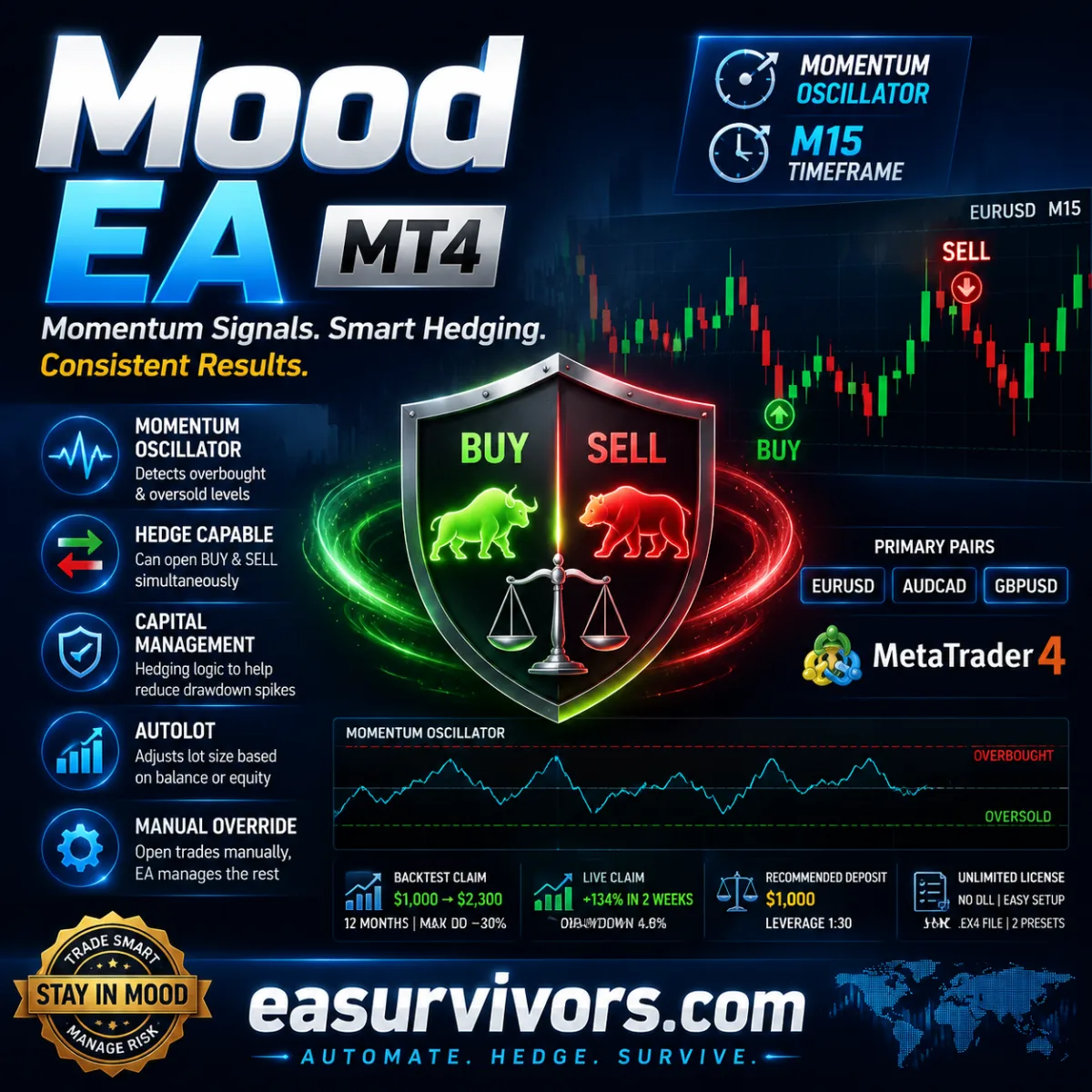
Traders looking for momentum-based automation on the MetaTrader 4 platform will find a specific kind of logic in this expert advisor. The system is built around an oscillator that identifies when price has moved far enough to be considered overextended. When conditions line up on the fifteen-minute chart, the EA opens a position. The vendor lists EURUSD, AUDCAD and GBPUSD as the primary instruments, but also states the code can run on other pairs.
The distinguishing feature is not the entry logic itself, which is a common momentum-reversal approach, but what happens after entries are opened. The EA can maintain positions in both directions at once. That means a trader may see a buy and a sell running simultaneously on the same pair. Some traders see this as a way to reduce drawdown spikes, others see it as a risk that locks in a loss on one side while waiting for the other to recover. The developer describes this as capital-management hedging, and it is the part of the system that most deserves scrutiny before deployment.
Momentum entries and manual override
The core signal comes from a momentum indicator. Oversold levels trigger long entries, overbought levels trigger short entries. This is a mean-reversion style rather than a trend-following one. On a fifteen-minute chart, such signals can appear frequently, which explains why the EA is set up to place trades automatically. A trader can also take manual control, and the EA will manage the positions according to its internal rules even if the trader opened them by hand.
Autolot functionality is included. This adjusts position size based on account balance or equity. The vendor states this is designed to use account margin in a reasonable way, but a trader should check the calculation method before going live. Position sizing that grows with balance can amplify both gains and losses. The EA does not expose source code, so the exact autolot formula cannot be independently verified.
How the strategy behaves in practice
A sceptical trader will want to know what happens when the market trends strongly. Momentum oscillators can stay overbought or oversold for long periods, which means the EA may open a position that immediately goes further against it. Because the system allows hedging, it does not necessarily close that losing trade. Instead, it may open an opposite position. The net result can be reduced floating drawdown in the account, but it can also create a basket of positions that becomes harder to manage.
The vendor reports a backtest where a $1,000 deposit reached $2,300 over twelve months, with a maximum drawdown of roughly 30 percent. These figures come from the developer and should be treated as a claim, not a guarantee. The same vendor also mentions a live account that grew 134 percent in two weeks with a 4.8 percent drawdown. Such a short observation window tells a trader very little about how the EA handles ranging months, news events or liquidity gaps.
Because the recommended minimum deposit is $1,000 and the leverage is stated as 1:30, the EA is not positioned for aggressive prop-firm challenges that allow very high leverage. The 1:30 figure is likely a broker restriction rather than an EA parameter, but it matters for anyone comparing this product against tools marketed for funded accounts.
Installation and configuration
The download includes a compiled expert file and two preset files. One preset targets EURUSD on the M15 chart with a 32 percent drawdown limit, the other references the H1 chart with a 30 percent limit. Traders who only use the M15 chart may wonder why an H1 preset is included. The vendor suggests the EA can trade any timeframe, but the official specification states M15 as the working timeframe. Running it on other timeframes may require different risk settings and should be tested before any live use.
The EA is delivered as an .ex4 file, which means source code is not included. That restricts the ability to audit the money management logic or change the momentum indicator parameters beyond what the input panel exposes. Experienced users often prefer to inspect the code before trusting their capital to an automated system. The licence is described as unlimited, with no DLL calls, which reduces some installation friction but also means the EA runs entirely within the MT4 sandbox without external data feeds.
Setup follows the standard MT4 procedure: copy the .ex4 file into the Experts folder, restart the terminal, and attach the EA to an M15 chart. The set files can be loaded through the input dialogue. Traders should check the autolot settings immediately, because a preset designed for a $1,000 account will not be appropriate for a $10,000 account without adjustment.
Realistic expectations
The product is marketed by its developer as a profitable system with low drawdown. Independent verification of the live track record is not provided. The backtest data is limited to a twelve-month period on EURUSD, and the live data covers only two weeks. A trader evaluating this EA should run their own forward test on a demo account for at least a few months before committing real money.
The hedging behaviour is the main variable that separates this EA from simple momentum scalpers. It can reduce visible drawdown while accumulating exposure. That is a trade-off, not a safety feature. An account with a 30 percent drawdown limit will tolerate a significant adverse move, but if the hedged position grows beyond that limit, the EA may close both sides at a loss. Understanding precisely when the system decides to flatten all positions is critical, yet that logic is hidden inside the compiled file.
For a trader who wants to test a momentum-based, hedge-capable EA on a demo account with a $1,000 starting balance and strict 1:30 leverage, this product may be a reasonable starting point. For a trader who needs full source code access or a verified multi-year track record, the lack of transparency will be a meaningful drawback. The manual order support and the simple set-file approach make it easy to try, and the absence of DLL calls means it deploys quickly on most MT4 installations.